

Mail connects your mailboxes to ERPoida. Conversations are shared with the right people, linked to the deal, invoice or ticket they are about, and answered with reusable templates. Flows can send emails on their own, which covers follow-ups and simple outreach without a separate tool.
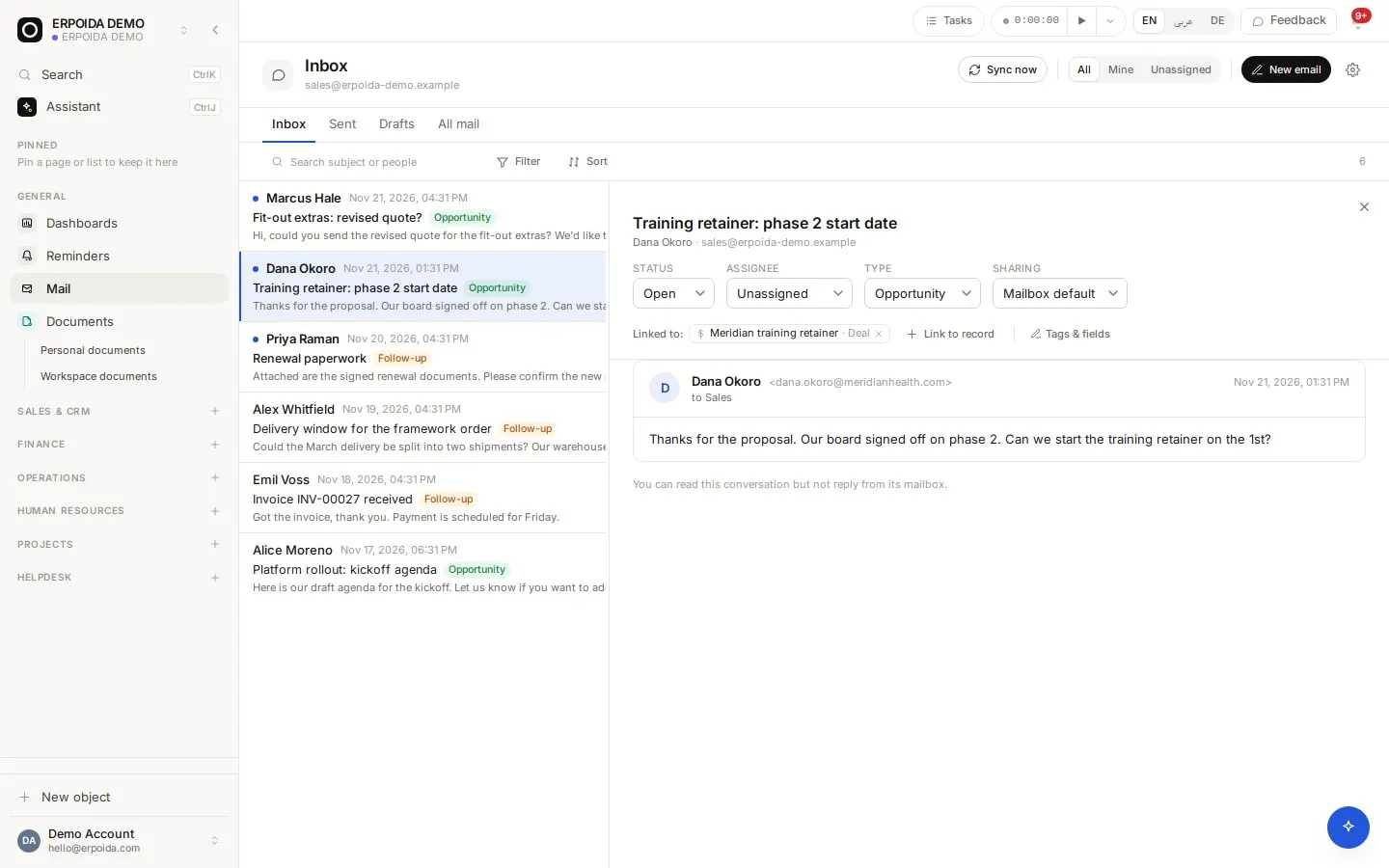
What it does
Shared mailboxes
Connect a mailbox and choose who can read, send or manage it. Send from verified aliases.
Threads with status
Assign a conversation, snooze it, set its status and classify it, like a lightweight help inbox.
Linked to records
Attach a thread to a deal, contact, invoice or ticket; it appears on that record for everyone.
Templates and automated emails
Save reusable templates, and use the Send email step in flows for follow-ups after a deal, invoice or form.
How to use it
Connect a mailbox
- Open Mail and connect your mailbox.
- Choose who can see it and who can send from it.
- Add sender aliases such as hello@ or invoices@.
- Link the first conversations to their deals or customers.
Automate a follow-up
- Save an email template with placeholders for the customer's name.
- Create a scheduled flow that finds deals in Proposal with no reply.
- Add a Send email step that uses the template for each deal.
- Turn the flow on and watch its runs.
Tips and tricks
- Snooze a thread until the day you need it back instead of leaving it unread.
- Link every customer email to its record: the next person sees the whole story.
- Use different aliases for invoices and support so replies land in the right queue.
Make it yours
Everything below is done in the app, without code, by anyone with admin rights. You can also ask the assistant to do it.
- Add custom fields to email threads, for example a topic or region.
- Build template sets per language for customers in different countries.
- Use a flow to classify incoming email and route it to the right person.
Ask the assistant
The assistant works through the same operations and permissions as you. Try:
- “Reply to the latest email from Talbot Interiors with our proposal template.”
- “Link this email thread to the Globex renewal deal.”
- “Show unassigned conversations in the support mailbox.”
Questions
Is this a newsletter tool?
No. Mail covers one-to-one customer email, shared inboxes and emails sent by flows. Bulk newsletters still belong in a dedicated tool.
Can the assistant send email for me?
Yes, from mailboxes you have send access to, under your permissions, and every send is logged.